Showing posts with label Doclink. Show all posts

Friday, August 29, 2025

Download and zip multiple attachments - via automation script

  • Maximo attachments can be uploaded and downloaded one at a time.
  • There is no out of the box option to select multiple attachments and download at once.
  • Here is a way to achive this via cusom dialog and automation sctipt.

Add custom dialog:

  • Modify or clone the View attachments dialog
  • Add a checkbox in the dialog to select the documents.

Type: Event

Event: toggleselectrow

  • Add a 'Download' custom action button at the footer of dialog.

Automation Script:
  • Create an action launch point for the button and write below code
from psdi.util import MXApplicationException;
from java.io import FileOutputStream;
from java.io import FileInputStream;
from java.nio.file import Paths;
from java.nio.file import Files;
from java.util.zip import ZipOutputStream;
from java.util.zip import ZipEntry;
from java.io import File;

if launchPoint=='<>':
    session=service.webclientsession()
    docTable=session.getDataBean("<dialog_id>")
    docVector=docTable.getSelection()
    
    filePaths=[]
    for doc in docVector:
        file=doc.getString("URLNAME")
        filePaths.append(file)
    
    downLoadPath="C:\\Users\\Public\\Downloads\\";
    fullPath=downLoadPath+"<FileName>.zip";
    fos = FileOutputStream(fullPath);
    zipOut = ZipOutputStream(fos);
  
    try:
        for filePath in filePaths:
            fileToZip = File(filePath);
            fis = FileInputStream(fileToZip);
            zipEntry = ZipEntry(fileToZip.getName());
            zipOut.putNextEntry(zipEntry);
            bytes = Files.readAllBytes(Paths.get(filePath));
            zipOut.write(bytes, 0, len(bytes));
            fis.close();
        zipOut.close();
        fos.close();
        print ("Compressed the Files to " +str(fullPath));        
																   
    except MXApplicationException as me:
        print ("Maximo Error : " + str(e));
    except Exception as e :
        print ("Error : " + str(e));

Monday, May 13, 2024

Automate Email attachment specific to a record

Automate Email attachment specific to a record
  Maximo can send email communication with attachments, in following ways.

  1. By adding a default attachment(s) to a communication template and wherever this template is used, it will send the associated files as well. But this is set to a default document(s) and cannot be specific to record.
  2. Other option is using 'Create Communication' option from an application, where user can manually add attachments and send.

This process of sending document specific to a record (like Workorder, PO etc.) OR a Person (like an approver in workflow) can be automated using script.


Create an Action Launch Point, add Script, choose script launguage as 'python/jython' and write code as explained below .

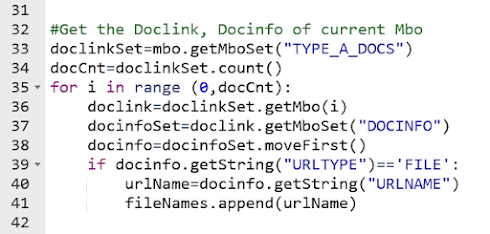
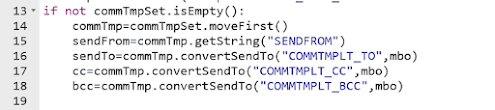
  • Import the MXServer and SqlFormat APIs; Use MXServer to get the communication template MboSet


    • Get the CommTemplate Mbo from MboSet;
      Use CommTemplate.convertSendTo() method to get the email IDs of sendTo, cc,bcc etc; Usually, these details are retrieved from a Role associated to Communication template or Workflow.

    • Use SqlFormat.resolvecontent() method to replace the values of binding variables in subject, message.
  • We can use custom relationship to get a specific type of documents. (Example: DOCTYPE='TYPE-A' and ownerid=:workorderid and ownertable='WORKORDER').
    Then, use the default relationship from DOCLINKS to DOCINFO to retrieve document details.(URLNAME, URLTYPE)
    Add the document path values (DOCINFO.URLNAME) to a string array. []


  • Finally, invoke the MXServer.SendEmail() method with sender, subject, message and attachment details. MXServer.sendEMail(sendTo, cc, bcc, sendFrom, subject, message, replyTo, fileNames, urlNames)


    Source Code:

Launch Point Variables in Maximo: Beyond the Attribute Binding

Most Maximo developers are familiar with Launch Point Variables , but in real-world implementations, their usage is often limited to just on...