Showing posts with label Email. Show all posts

Monday, July 15, 2024

Maximo has in-built functionality of processing workflow assignment, updating /creating records using ‘𝐄𝐦𝐚𝐢𝐥 𝐈𝐧𝐭𝐞𝐫𝐚𝐜𝐭𝐢𝐨𝐧’ application. This however, has few drawbacks.
◾ 𝘜𝘴𝘦𝘳 𝘮𝘶𝘴𝘵 𝘮𝘢𝘯𝘶𝘢𝘭𝘭𝘺 𝘵𝘺𝘱𝘦 𝘵𝘩𝘦 𝘙𝘦𝘴𝘱𝘰𝘯𝘴𝘦 𝘤𝘰𝘥𝘦, 𝘵𝘺𝘱𝘪𝘤𝘢𝘭𝘭𝘺 1 𝘰𝘳 2, 𝘵𝘩𝘦𝘯 𝘴𝘦𝘯𝘥 𝘦𝘮𝘢𝘪𝘭 𝘳𝘦𝘴𝘱𝘰𝘯𝘴𝘦. 𝘐𝘧 𝘶𝘴𝘦𝘳 𝘮𝘪𝘴𝘵𝘺𝘱𝘦 𝘰𝘳 𝘢𝘥𝘥 𝘦𝘹𝘵𝘳𝘢 𝘴𝘱𝘢𝘤𝘦 𝘸𝘩𝘪𝘭𝘦 𝘴𝘦𝘯𝘥𝘪𝘯𝘨, 𝘪𝘵 𝘮𝘢𝘺 𝘧𝘢𝘪𝘭.
◾ 𝘈𝘭𝘴𝘰, 𝘵𝘩𝘦 𝘦𝘮𝘢𝘪𝘭 𝘸𝘪𝘭𝘭 𝘩𝘢𝘷𝘦 𝘥𝘦𝘵𝘢𝘪𝘭𝘴 𝘭𝘪𝘬𝘦 𝘓𝘚𝘕𝘙𝘐𝘋, 𝘞𝘍𝘈𝘚𝘚𝘐𝘎𝘕𝘔𝘌𝘕𝘛𝘐𝘋 𝘦𝘵𝘤. 𝘸𝘩𝘪𝘤𝘩 𝘮𝘢𝘺 𝘯𝘰𝘵 𝘣𝘦 𝘱𝘳𝘦𝘧𝘦𝘳𝘢𝘣𝘭𝘦 𝘣𝘺 𝘴𝘰𝘮𝘦 𝘤𝘭𝘪𝘦𝘯𝘵𝘴.

There is an 𝐚𝐥𝐭𝐞𝐫𝐧𝐚𝐭𝐞 way to achieve this via automation script as below. 
1. When a workflow is assigned to specific User/Role, Maximo will send Email containing two 𝐡𝐲𝐩𝐞𝐫𝐥𝐢𝐧𝐤𝐬 to 𝐀𝐩𝐩𝐫𝐨𝐯𝐞/𝐑𝐞𝐣𝐞𝐜𝐭 the assignment and other details.
2. On 𝐜𝐥𝐢𝐜𝐤 of 𝐡𝐲𝐩𝐞𝐫𝐥𝐢𝐧𝐤, will create 𝐧𝐞𝐰 𝐄𝐦𝐚𝐢𝐥 with ‘𝐖𝐨𝐫𝐤𝐟𝐥𝐨𝐰 𝐀𝐬𝐬𝐢𝐠𝐧𝐦𝐞𝐧𝐭 𝐈𝐃 𝐚𝐧𝐝 𝐑𝐞𝐬𝐩𝐨𝐧𝐬𝐞 𝐜𝐨𝐝𝐞 (𝑨𝒑𝒑𝒓𝒐𝒗𝒆 𝒐𝒓 𝑹𝒆𝒋𝒆𝒄𝒕)’ 𝐢𝐧 𝐒𝐮𝐛𝐣𝐞𝐜𝐭, then user only need to 𝐜𝐥𝐢𝐜𝐤 ‘𝑺𝒆𝒏𝒅’.
This way,
✔𝘜𝘴𝘦𝘳 𝘥𝘰 𝘯𝘰𝘵 𝘯𝘦𝘦𝘥 𝘵𝘰 𝘵𝘺𝘱𝘦 𝘢𝘯𝘺 𝘳𝘦𝘴𝘱𝘰𝘯𝘴𝘦 𝘤𝘰𝘥𝘦 𝘖𝘙 𝘴𝘦𝘦 𝘢𝘯𝘺 𝘵𝘦𝘤𝘩𝘯𝘪𝘤𝘢𝘭 𝘥𝘢𝘵𝘢 𝘪𝘯 𝘐𝘯𝘣𝘰𝘶𝘯𝘥 𝘌𝘮𝘢𝘪𝘭. 
✔ 𝘕𝘰 𝘯𝘦𝘦𝘥 𝘵𝘰 𝘤𝘰𝘯𝘧𝘪𝘨𝘶𝘳𝘦 𝘌𝘴𝘤𝘢𝘭𝘢𝘵𝘪𝘰𝘯 𝘵𝘰 𝘴𝘦𝘯𝘥 𝘐𝘯𝘵𝘦𝘳𝘢𝘤𝘵𝘪𝘷𝘦 𝘰𝘶𝘵𝘣𝘰𝘶𝘯𝘥 𝘌𝘮𝘢𝘪𝘭𝘴.

Click here for more details.

Monday, May 13, 2024

Automate Email attachment specific to a record

Automate Email attachment specific to a record
  Maximo can send email communication with attachments, in following ways.

  1. By adding a default attachment(s) to a communication template and wherever this template is used, it will send the associated files as well. But this is set to a default document(s) and cannot be specific to record.
  2. Other option is using 'Create Communication' option from an application, where user can manually add attachments and send.

This process of sending document specific to a record (like Workorder, PO etc.) OR a Person (like an approver in workflow) can be automated using script.


Create an Action Launch Point, add Script, choose script launguage as 'python/jython' and write code as explained below .

  • Import the MXServer and SqlFormat APIs; Use MXServer to get the communication template MboSet


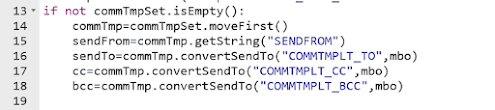
    • Get the CommTemplate Mbo from MboSet;
      Use CommTemplate.convertSendTo() method to get the email IDs of sendTo, cc,bcc etc; Usually, these details are retrieved from a Role associated to Communication template or Workflow.

    • Use SqlFormat.resolvecontent() method to replace the values of binding variables in subject, message.
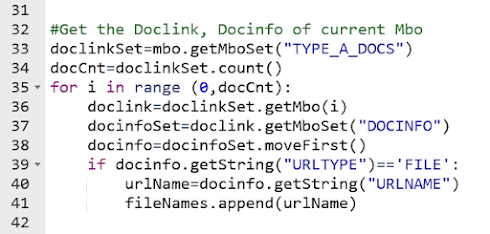
  • We can use custom relationship to get a specific type of documents. (Example: DOCTYPE='TYPE-A' and ownerid=:workorderid and ownertable='WORKORDER').
    Then, use the default relationship from DOCLINKS to DOCINFO to retrieve document details.(URLNAME, URLTYPE)
    Add the document path values (DOCINFO.URLNAME) to a string array. []


  • Finally, invoke the MXServer.SendEmail() method with sender, subject, message and attachment details. MXServer.sendEMail(sendTo, cc, bcc, sendFrom, subject, message, replyTo, fileNames, urlNames)


    Source Code:

Launch Point Variables in Maximo: Beyond the Attribute Binding

Most Maximo developers are familiar with Launch Point Variables , but in real-world implementations, their usage is often limited to just on...