Sunday, June 9, 2024


  SQL Query to get the Auto Script Launch Point Events

  • Maximo automation script has different launch points such as Attribute, Object, Action etc. The values like 'Objectname', 'Attributename', 'Launch Point Type' etc. can be viewed via both Maximo application and back end 
  • But Object events ('Before Save' After Save' with combination on 'Add/Update/Delete') and Attribute events ('Validate','Run Action' etc.) are stored as number format in the 'OBJECTEVENT' column of SCRIPTLAUNCHPOINT table. 
  • This number follow certain sequence and multiplication of factor specific to launch point type. It is quite complex task to identify these values from back end. 
  • Here is a simple query to get these values via back end. This is useful for Object and Attribute launch point events.    
SELECT OBJECTEVENT,
CASE 
WHEN LAUNCHPOINTTYPE ='OBJECT' THEN 
	CASE 
	WHEN OBJECTEVENT=1 THEN 'Initialize' 
	WHEN OBJECTEVENT BETWEEN 2 AND 14 THEN
		CASE 
		WHEN OBJECTEVENT/2=1 THEN 'BeforeSave - Add' 
        WHEN OBJECTEVENT/2=2 THEN 'BeforeSave - Update' 
        WHEN OBJECTEVENT/2=3 THEN 'BeforeSave - Add+Update'
		WHEN OBJECTEVENT/2=4 THEN 'BeforeSave - Delete' 
        WHEN OBJECTEVENT/2=5 THEN 'BeforeSave - Add+Delete'
		WHEN OBJECTEVENT/2=6 THEN 'BeforeSave - Update+Delete' 
        WHEN OBJECTEVENT/2=7 THEN 'BeforeSave - Add+Update+Delete'
		END
	WHEN OBJECTEVENT BETWEEN 16 AND 112 THEN
		CASE 
		WHEN OBJECTEVENT/16=1 THEN 'After Save - Add' 
        WHEN OBJECTEVENT/16=2 THEN 'After Save - Update' 
        WHEN OBJECTEVENT/16=3 THEN 'After Save - Add+Update'
		WHEN OBJECTEVENT/16=4 THEN 'After Save - Delete' 
        WHEN OBJECTEVENT/16=5 THEN 'After Save - Add+Delete'
		WHEN OBJECTEVENT/16=6 THEN 'After Save - Update+Delete' 
        WHEN OBJECTEVENT/16=7 THEN 'After Save - Add+Update+Delete'		
		END
	WHEN OBJECTEVENT BETWEEN 128 AND 896 THEN 
		CASE 
		WHEN OBJECTEVENT/128=1 THEN 'After Commit - Add' 
        WHEN OBJECTEVENT/128=2 THEN 'After Commit - Update' 
        WHEN OBJECTEVENT/128=3 THEN 'After Commit - Add+Update'
		WHEN OBJECTEVENT/128=4 THEN 'After Commit - Delete' 
        WHEN OBJECTEVENT/128=5 THEN 'After Commit - Add+Delete'
		WHEN OBJECTEVENT/128=6 THEN 'After Commit - Update+Delete' 
        WHEN OBJECTEVENT/128=7 THEN 'After Commit - Add+Update+Delete'		
		END
	END
WHEN LAUNCHPOINTTYPE='ATTRIBUTE' THEN 
	CASE 
	WHEN OBJECTEVENT=0 THEN 'Validate'
    WHEN OBJECTEVENT=1 THEN 'Run action' 
    WHEN OBJECTEVENT=2 THEN 'Initialize' 
    WHEN OBJECTEVENT=8 THEN 'Initialize Access Restriction'
	WHEN OBJECTEVENT=64 THEN 'Retrieve list'
	END
WHEN OBJECTEVENT IS NULL THEN 'Not Applicable'
END as EventType,* FROM SCRIPTLAUNCHPOINT

The SQL Query is based logic as explained below .
Object event types can be assigned a factor based on the range of 'Object event' value.
TypeRange of valuesFactor
Before Save  >=2<=142
After Save >=16<=11216
After Commit >=128<=896128

Apply the below Formula and get the results specific Sub-event type.

            Value = ObjectEvent / EventFactor

ObjectEvent = SCRIPTLAUNCHPOINT.OBJECTEVENT
EventFactor = Value from above table. (2, 16, 128)

Now, map the output of above formula to 'Sub-Event type' such as Add/Update/Add+Update etc. to get the final result.

EventValue
Add    1
Update    2
Add+Update    3
Delete    4
Add+Delete    5
Update+Delete    6
Add+Update+Delete    7
    

Monday, May 13, 2024

Automate Email attachment specific to a record

Automate Email attachment specific to a record
  Maximo can send email communication with attachments, in following ways.

  1. By adding a default attachment(s) to a communication template and wherever this template is used, it will send the associated files as well. But this is set to a default document(s) and cannot be specific to record.
  2. Other option is using 'Create Communication' option from an application, where user can manually add attachments and send.

This process of sending document specific to a record (like Workorder, PO etc.) OR a Person (like an approver in workflow) can be automated using script.


Create an Action Launch Point, add Script, choose script launguage as 'python/jython' and write code as explained below .

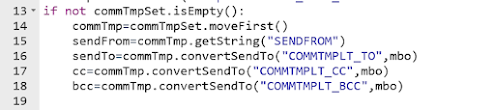
  • Import the MXServer and SqlFormat APIs; Use MXServer to get the communication template MboSet


    • Get the CommTemplate Mbo from MboSet;
      Use CommTemplate.convertSendTo() method to get the email IDs of sendTo, cc,bcc etc; Usually, these details are retrieved from a Role associated to Communication template or Workflow.

    • Use SqlFormat.resolvecontent() method to replace the values of binding variables in subject, message.
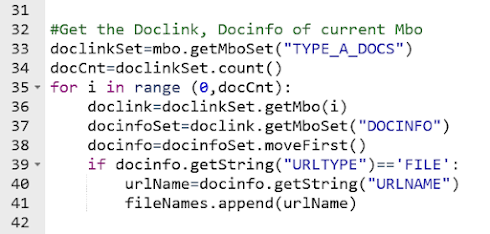
  • We can use custom relationship to get a specific type of documents. (Example: DOCTYPE='TYPE-A' and ownerid=:workorderid and ownertable='WORKORDER').
    Then, use the default relationship from DOCLINKS to DOCINFO to retrieve document details.(URLNAME, URLTYPE)
    Add the document path values (DOCINFO.URLNAME) to a string array. []


  • Finally, invoke the MXServer.SendEmail() method with sender, subject, message and attachment details. MXServer.sendEMail(sendTo, cc, bcc, sendFrom, subject, message, replyTo, fileNames, urlNames)


    Source Code:

Friday, April 12, 2024

Get count of JMS Queue Messages using Automation Script

  • Maximo use JMS queues for inbound, outbound data processing. These messages and message count can be manually viewed from External System application.
  • Here is a simple automation script to get the count of Messages in JMS Queues. It  can be used in Action Launch point to view message count in 'Action button' of an application  OR in an Escalation to send details via Email.

Script:

from psdi.iface.jms import JMSQueueBrowser
from psdi.iface.jms import MaxQueueCache
from psdi.iface.jms import QueueConfig
from psdi.iface.jms import JMSData

qbrowser = None
queueName = "jms/maximo/int/queues/cqin"
selector = "SENDER='ABC'"
config = MaxQueueCache.getInstance().getQueueConfig(queueName);
connectionFactory = config.getConfactName();
env = config.getEnv()
qbrowser = JMSQueueBrowser(queueName, connectionFactory, selector, env);
qList = qbrowser.getAllMessages();
qCount=len(qList)

#raise TypeError("Messages Count - "+str(qCount))
print '-- Number of Messages in the Queue : ' +str(qCount)


Script Variables:
queueName = path of the JMS queue as configured in Maximo


Launch Point Variables in Maximo: Beyond the Attribute Binding

Most Maximo developers are familiar with Launch Point Variables , but in real-world implementations, their usage is often limited to just on...